
9: storage ingress
Part of the Installing Kubernetes with kubeadm series
Contents
The cluster is healthy and HA, but it’s not yet useful. Stateful workloads need somewhere to put their data, and HTTP workloads need a way to be reachable. This post installs local-path-provisioner as a default StorageClass, ingress-nginx as our ingress controller, and cert-manager so we can pull Let’s Encrypt certificates without thinking about it.
The shape of what we’re adding #
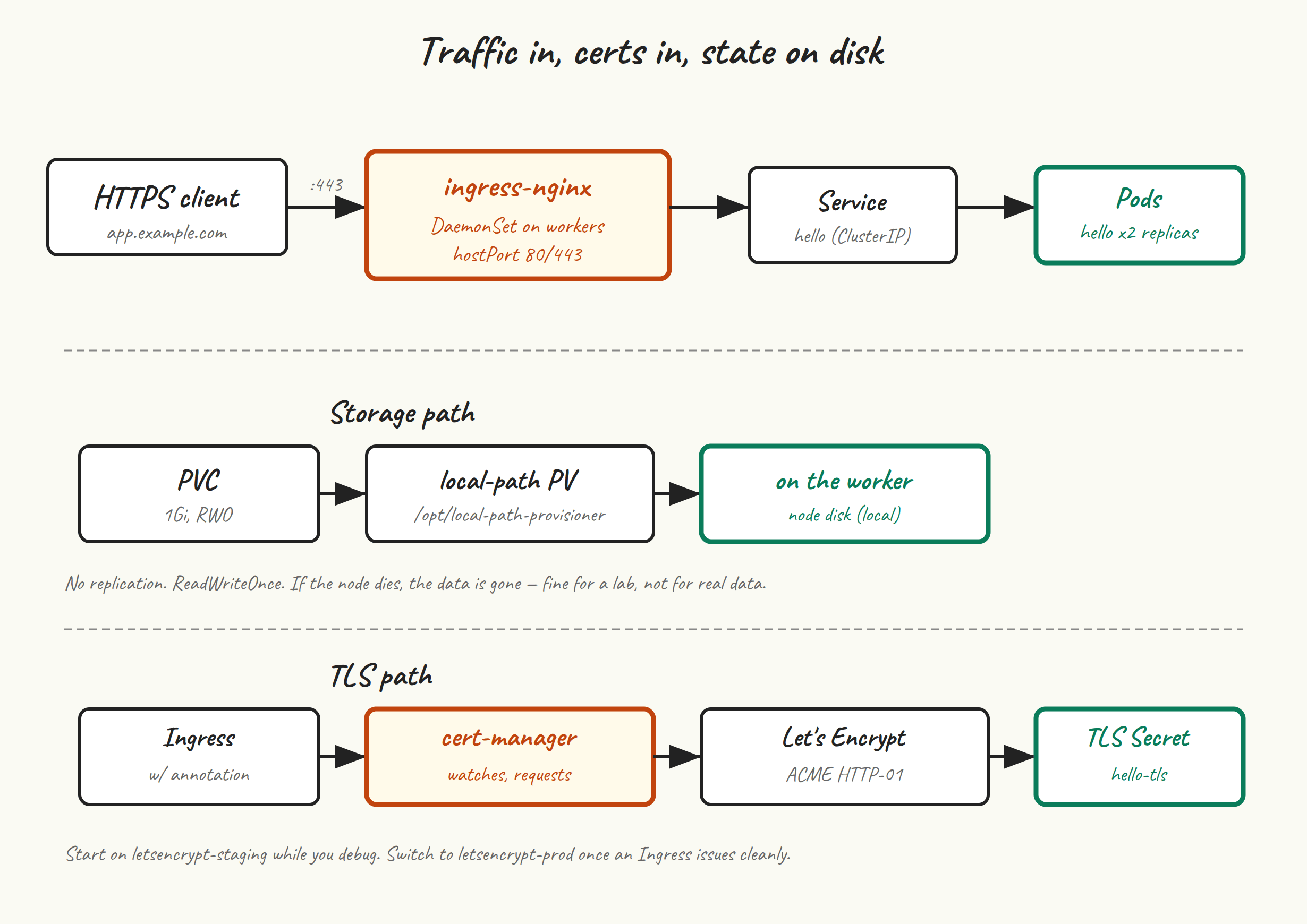
- local-path-provisioner watches for PVCs that ask for the
local-pathStorageClass and provisions a directory on whichever node the pod lands on as the PV. Fine for a lab; not appropriate for production data that needs to survive node loss. - ingress-nginx runs as a DaemonSet on workers, accepts incoming HTTP(S), and routes by Host header / path to Services. We’ll bind it to
hostPort80 and 443 on each worker, so any worker IP can take ingress traffic. - cert-manager watches for
Certificateresources (orcert-manager.io/cluster-issuerannotations on Ingresses) and provisions TLS certs by talking to ACME, including Let’s Encrypt.
local-path-provisioner #
kubectl apply -f https://raw.githubusercontent.com/rancher/local-path-provisioner/v0.0.30/deploy/local-path-storage.yaml

kubectl -n local-path-storage get pods
# local-path-provisioner-xxxxx   1/1   Running
By default it creates PVs under /opt/local-path-provisioner on whatever node the pod lands on. Make it the cluster default StorageClass:
kubectl patch storageclass local-path \
  -p '{"metadata":{"annotations":{"storageclass.kubernetes.io/is-default-class":"true"}}}'

kubectl get storageclass
# NAME                   PROVISIONER             RECLAIMPOLICY ...
# local-path (default)   rancher.io/local-path   Delete
Now PVCs without an explicit storageClassName get the local-path treatment.
Test it #
cat <<'EOF' | kubectl apply -f -
apiVersion: v1
kind: PersistentVolumeClaim
metadata:
  name: test-pvc
spec:
  accessModes: ["ReadWriteOnce"]
  resources:
    requests:
      storage: 1Gi
---
apiVersion: v1
kind: Pod
metadata:
  name: test-storage
spec:
  containers:
  - name: app
    image: busybox
    command: ["sh","-c","echo hello > /data/x; sleep 3600"]
    volumeMounts:
    - { name: data, mountPath: /data }
  volumes:
  - name: data
    persistentVolumeClaim: { claimName: test-pvc }
EOF

kubectl get pvc test-pvc
# NAME       STATUS   VOLUME       CAPACITY   STORAGECLASS
# test-pvc   Bound    pvc-...      1Gi        local-path

kubectl exec test-storage -- cat /data/x
# hello

kubectl delete pod test-storage
kubectl delete pvc test-pvc
A note on what local-path can’t do: it’s ReadWriteOnce, single-node, and the PV is gone if the node it lives on is gone. For real workloads where you want resilient storage, you’d run Longhorn, Rook+Ceph, or hook into your hypervisor’s storage (CSI drivers for vSphere, Proxmox, etc). local-path is what we use here because it works on every node without any setup.
ingress-nginx #
We’re going to install ingress-nginx as a DaemonSet on the worker nodes, with hostPort: 80 and hostPort: 443 so any worker IP can take incoming traffic. The “proper” production setup would be a separate LoadBalancer Service (e.g. backed by MetalLB or kube-vip’s other mode), but hostPort works fine for a lab and lets you point your router or DNS at the worker IPs directly.
helm repo add ingress-nginx https://kubernetes.github.io/ingress-nginx
helm repo update

cat <<'EOF' > ingress-nginx-values.yaml
controller:
  kind: DaemonSet
  hostPort:
    enabled: true
    ports:
      http: 80
      https: 443
  service:
    enabled: false
  nodeSelector:
    node-role.kubernetes.io/worker: ""
  ingressClassResource:
    default: true
  config:
    use-forwarded-headers: "true"
EOF

helm install ingress-nginx ingress-nginx/ingress-nginx \
  --namespace ingress-nginx \
  --create-namespace \
  -f ingress-nginx-values.yaml
What’s going on in those values:
kind: DaemonSet— one ingress controller per worker.hostPort.enabled: true— bind 80 and 443 directly on the node, no Service required.service.enabled: false— we don’t need a Service object if we’re binding hostPorts.nodeSelector— only on workers, not control plane nodes.ingressClassResource.default: true— Ingresses without an explicitingressClassNameget this one.
kubectl -n ingress-nginx get pods -o wide
# ingress-nginx-controller-xxxxx   1/1   Running   ...   worker-1
# ingress-nginx-controller-yyyyy   1/1   Running   ...   worker-2
Sanity check: from anywhere that can reach the worker IPs:
curl -I http://192.168.10.21
# HTTP/1.1 404 Not Found
# Server: nginx
The 404 is what we want — ingress-nginx is responding, it just has no Ingress objects yet to route to.
cert-manager #
helm repo add jetstack https://charts.jetstack.io
helm repo update

helm install cert-manager jetstack/cert-manager \
  --namespace cert-manager \
  --create-namespace \
  --version v1.17.0 \
  --set installCRDs=true

kubectl -n cert-manager get pods
# cert-manager-...               1/1   Running
# cert-manager-cainjector-...    1/1   Running
# cert-manager-webhook-...       1/1   Running
A Let’s Encrypt ClusterIssuer #
Start with the staging issuer. Let’s Encrypt’s production has aggressive rate limits and you don’t want to hit them while debugging cert-manager. Get a staging cert first, switch to production once it works.
cat <<'EOF' | kubectl apply -f -
apiVersion: cert-manager.io/v1
kind: ClusterIssuer
metadata:
  name: letsencrypt-staging
spec:
  acme:
    server: https://acme-staging-v02.api.letsencrypt.org/directory
    email: you@example.com
    privateKeySecretRef:
      name: letsencrypt-staging-account
    solvers:
    - http01:
        ingress:
          ingressClassName: nginx
---
apiVersion: cert-manager.io/v1
kind: ClusterIssuer
metadata:
  name: letsencrypt-prod
spec:
  acme:
    server: https://acme-v02.api.letsencrypt.org/directory
    email: you@example.com
    privateKeySecretRef:
      name: letsencrypt-prod-account
    solvers:
    - http01:
        ingress:
          ingressClassName: nginx
EOF
Substitute a real email address. Let’s Encrypt uses it for expiry notices and policy updates.
The HTTP-01 challenge needs your cluster’s ingress-nginx to be reachable from the public internet at the domain you’re requesting a cert for. For a homelab, that usually means port-forwarding 80/443 from your router to a worker IP and pointing the domain’s DNS at your public IP. (DNS-01 is the alternative, doesn’t require a public ingress, and is what you’d do for internal-only domains — cert-manager has a separate solver for that, with a config per DNS provider.)
End-to-end: deploy something with TLS #
Replace app.example.com with a domain you actually control:
cat <<'EOF' | kubectl apply -f -
apiVersion: apps/v1
kind: Deployment
metadata:
  name: hello
spec:
  replicas: 2
  selector: { matchLabels: { app: hello } }
  template:
    metadata: { labels: { app: hello } }
    spec:
      containers:
      - name: hello
        image: traefik/whoami
        ports: [{ containerPort: 80 }]
---
apiVersion: v1
kind: Service
metadata: { name: hello }
spec:
  selector: { app: hello }
  ports: [{ port: 80, targetPort: 80 }]
---
apiVersion: networking.k8s.io/v1
kind: Ingress
metadata:
  name: hello
  annotations:
    cert-manager.io/cluster-issuer: letsencrypt-staging
spec:
  ingressClassName: nginx
  tls:
  - hosts: [app.example.com]
    secretName: hello-tls
  rules:
  - host: app.example.com
    http:
      paths:
      - path: /
        pathType: Prefix
        backend:
          service:
            name: hello
            port:
              number: 80
EOF
Watch the certificate get issued:
kubectl get certificate
# NAME        READY   SECRET      AGE
# hello-tls   False   hello-tls   10s
# ... 30 seconds pass ...
# hello-tls   True    hello-tls   45s

kubectl describe certificate hello-tls   # if it's not progressing
When READY flips to True, you have a working cert. Test:
curl -kI https://app.example.com
# HTTP/2 200
# server: nginx
The -k is because the staging cert won’t validate against the public CA bundle. Once it works, edit the Ingress annotation to letsencrypt-prod and delete the staging secret so cert-manager re-issues from production:
kubectl delete secret hello-tls
# cert-manager will see the missing secret and re-request from prod
If the cert won’t issue #
Three things to check:
- DNS.
dig app.example.comfrom anywhere should return your cluster’s public IP. - Reachability on port 80.
curl http://app.example.com/.well-known/acme-challenge/testfrom the public internet should not time out (it’ll 404, which is fine — Let’s Encrypt cares that the connection succeeds). - The Order resource.
kubectl describe order $(kubectl get order -o name | head -1)usually has a useful error message from Let’s Encrypt itself.
Next up #
One post left. Post 10 is day-2 operations: how to upgrade the cluster, how to back up etcd, and a short tour of the failure modes you’ll actually meet in the first six months of running this thing.